


MLB Ballpark
4.112.90K Reviews
App Specs
- Version
- 15.8.1
- Updated On
- License
- Free
- Downloads
- 10,000,000+
- Developer
- MLB Advanced Media, L.P.
- Categories
- Sports
- Platform
- Android, iOS
Screenshots

 Analysis by AppCompare
For me, MLB Ballpark makes the most sense when a game-day visit involves more than simply finding a seat. It is built around the practical side of going to a Major League Baseball game: keeping track of tickets, finding your way around a stadium, and staying connected to the day’s events. That focus gives it a useful role in a fan’s routine, though I would not treat it as a complete replacement for every baseball app or as essential for someone who rarely visits a ballpark.
A companion for the whole trip to the stadium
The app is a free sports app from MLB Advanced Media, L.P., and its purpose is narrower and more venue-focused than a general sports news app. That distinction matters. If I’m planning a visit, I want tools that help me get through the entrance and orient myself once I’m inside; if I’m at home looking for broad baseball coverage, a score-focused app may be a more natural first choice. The strongest case for MLB Ballpark is that it brings stadium-related tasks together rather than asking fans to juggle paper tickets, separate venue information, and a collection of unrelated resources.
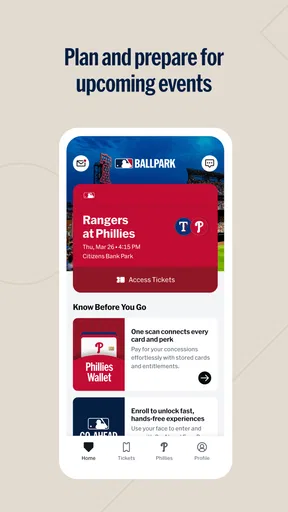
A realistic use begins before the first pitch. I can check that my ticket is available on my phone, confirm the plan with the people coming with me, and think ahead about where we’ll go once we enter. At the park, the same phone can help with navigation and keeping an eye on game information. That continuity is the practical benefit: fewer moments spent searching through messages or trying to remember which screen has the detail I need.
The app has been around since 2012, and its current version is 15.5.0. It has a 4.2 average from around 198,000 ratings, with over 5 million installs. Those numbers suggest it has become a familiar tool for many fans, but I would still judge it by whether it fits the specific way you attend games. Someone who visits a different stadium each season may get more value from venue guidance than a local fan who knows every entrance and concession area by heart.
Where its stadium focus pays off
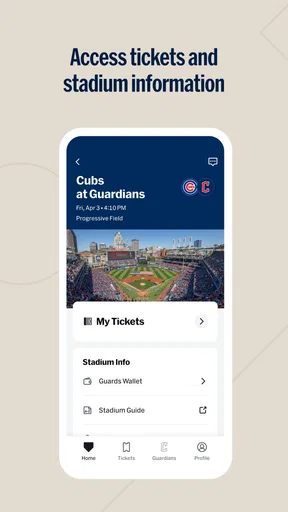
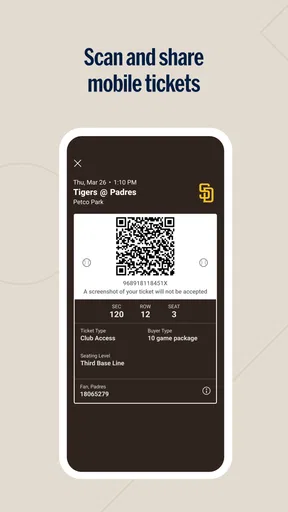
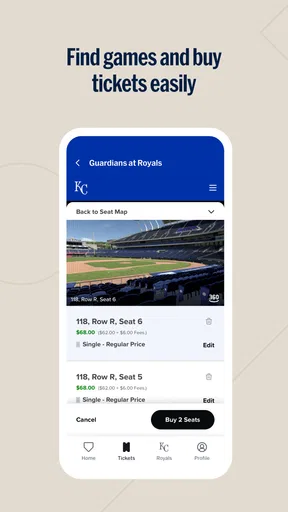
Tickets are one of the most useful reasons to have the app ready before leaving home. Digital access can reduce dependence on a printed ticket and make it easier to keep entry details together on the device you already carry. The ability to buy, sell, and transfer tickets also supports common group plans: if one person can no longer go, or a friend is joining later, having ticket handling in the same place can make coordination less awkward. I would still check that each ticket is visible and accessible before setting off, rather than assuming a last-minute handoff will go smoothly in a crowded entrance area.
That small bit of preparation is especially valuable when the person who bought the seats is not arriving with the whole group. A sensible workflow is to sort out ticket transfers while everyone has time to open the app, then agree on a meeting point outside the gates. It avoids trying to troubleshoot access while a line is moving. For families or friends, I also like the idea of deciding in advance who will keep the ticket information handy, instead of relying on one person to pass a phone around at the entrance.
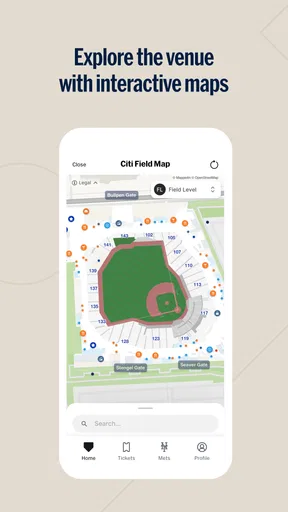
Stadium maps can be more than a novelty when the venue is unfamiliar. A first-time visitor may need to locate a restroom, merchandise stand, or concession area without wandering away from the group. I’d use the map before walking off: identify the section and a nearby landmark, then decide whether it is quicker to split up or go together. That is a modest but genuinely helpful use, particularly when a short break risks turning into a long search. A map does not remove the need to pay attention to signs or ask staff when the route is unclear, but it can give you a useful starting point.
Worth Reading Before You Choose

Flipboard Shows What News Apps Must Do Beyond the Feed

Switching to Android Auto Means Rethinking Your Driving Routine

Google Calendar Makes a Crowded Week Easier to Manage

Ludo King Makes the Most of the Minutes Between Plans

Baby Panda World Brings Quick Play to Modern Phones, but Its Game Library Feels Busy

ESPN’s Live Game View Makes Following Close Games Easier
There is also a trade-off in relying on a phone for several parts of the visit. If tickets and directions are both on the device, keeping it charged and accessible becomes part of the plan. I would open the ticket before joining an entry queue and avoid leaving the practical details until the busiest moment. That is not a special feature; it is simply a more reliable way to use a digital ticketing tool in a place where crowds and distractions are part of the experience.
Live information without losing the day
Game updates are useful when I’m temporarily away from my seat, whether I’m waiting for food or helping someone find the right section. Play-by-play and real-time statistics can help me catch up on what happened while I was distracted, without needing to ask the people around me for a full recap. Fantasy baseball players may also appreciate having stats close at hand, although I see this as a convenient extra rather than the app’s main reason to install it.
The key is to use those updates in a way that adds to the outing instead of pulling attention away from it. If I’m at the game with friends, I would glance at a score or play detail when I miss an inning, then put the phone away and watch. For someone following a second game at the same time, live information can be more central, but a dedicated scores app may offer a better experience if tracking several matchups is the main goal. The ballpark app’s value is strongest when live updates support the visit rather than compete with it.
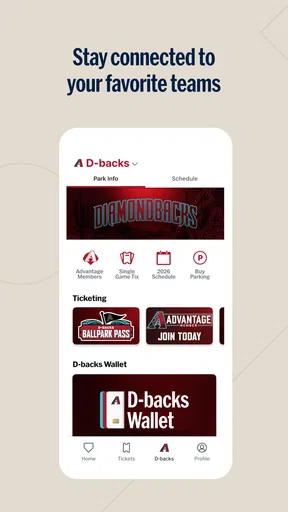
Personalized team news can make browsing feel more relevant for fans who follow one club closely. Instead of treating all teams as equally important, the app can bring preferred-team material forward. That is handy between games, though I would not install it solely for headlines if I already use a broader baseball news service that covers multiple teams, leagues, and topics in one feed. The choice depends on whether I want a stadium companion that also keeps me connected to my team, or a dedicated news destination first.
Useful extras, with a few reasons to be selective
Gameday check-in gives the visit a light social element and can connect attendance with rewards or discounts. I can see the appeal for a regular attendee who enjoys marking games and checking for offers. I would not plan a trip around rewards, though; they are a bonus, not a dependable reason to attend or a substitute for checking the actual terms of an offer. The feature is most worthwhile when checking in already feels natural and takes little effort.
Year-round material, including interviews and behind-the-scenes content, gives fans something to explore when there is no game-day errand to handle. Merchandise and fan gear also provide another route into the club experience. These extras broaden the app beyond ticket storage, but they may not matter much to someone who already has a preferred place for news, video, or shopping. I’d treat them as convenient additions rather than assume that every fan needs to use every part of the app.
That is also where the app’s limits become clearer. A stadium-centered design is a strength on game day but can feel less compelling when I am not visiting a venue. Someone who wants only league-wide scores, in-depth analysis, or a broad stream of baseball news may be better served by a general sports app. Likewise, a fan who has already memorized the layout of a home park may open the map rarely. The useful question is not whether the app has many tools, but whether those tools solve problems I actually face.
Another practical consideration is that a digital companion asks me to manage more through a phone. That can be convenient, but it also means checking ticket access and keeping the device ready before arriving. I would not make the app my only source of essential plans until I had opened it and confirmed that the relevant information was there. That bit of caution is worthwhile for any event app, especially when a group is depending on one person to coordinate entry.
Getting Started with MLB Ballpark
First things first, downloading the MLB Ballpark app is as easy as hitting a single. Available on both Android and iOS, it’s accessible to just about everyone. Once you have it, setting it up is a breeze. The app greets you with a clean and intuitive interface that even your tech-challenged friend can navigate without a hitch.
Features That Stand Out
Alright, let’s talk features because this app packs quite a few. From digital tickets to interactive maps, it's like having a Swiss Army knife for your ballpark adventures. The app allows you to buy, sell, and transfer tickets seamlessly, eliminating the need to queue up at the stadium. Plus, you can store your tickets digitally, which is a godsend for someone like me who's prone to losing paper tickets.
One of the standout features is the interactive stadium maps. Imagine having a guide that not only tells you where you are but also where the nearest hot dog stand is. It's super handy, especially if you're visiting a new stadium for the first time. The maps are detailed, covering everything from restrooms to merchandise stands.
Another feature I absolutely love is the gameday check-in. It’s a fun way to share your experiences with friends and fellow fans. Plus, you can earn rewards and discounts just for checking in. Who doesn’t love a good deal, right?
Live Game Enhancements
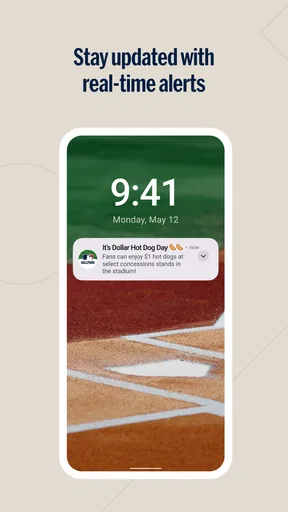
For those of us who live for the thrill of the game, the app offers live game updates that keep you in the loop, even if you’re stuck in line at the concession stand. You can follow the play-by-play action with real-time stats, and if you're a fantasy baseball player, this is a feature you'll definitely appreciate.
And let’s not forget about the personalized content. The app tailors news and highlights to your favorite teams. So, if you’re a die-hard Yankees fan, you won’t have to sift through the sea of Red Sox updates. It's like having a personal assistant who knows exactly what you want to see.
Enhancing the Fan Experience
Beyond gameday, the MLB Ballpark app keeps the baseball spirit alive with year-round content. From player interviews to behind-the-scenes footage, there's always something to keep you entertained between games. Plus, the app connects you with fellow fans through social features, making it easy to share your love for the game.
And if you’re someone who loves collecting memorabilia, the app provides access to exclusive merchandise and fan gear. It’s like a one-stop-shop for all things baseball, straight from your phone.
Final Thoughts
In a world where convenience is king, the app delivers in spades. Whether you’re a casual fan or a seasoned ballpark veteran, it enhances your experience in ways you didn’t know you needed. It’s more than just a ticket holder; it’s a gateway to a richer, more connected baseball experience.
So, next time you’re planning a trip to the ballpark, make sure the app is part of your lineup. It's a game-changer that ensures every visit is a grand slam. Trust me, once you start using it, you won't want to head to a game without it.
Who will get the most from it
I’d recommend it most to people who attend games and want a single place for the practical details around a visit. First-time visitors, fans traveling to an unfamiliar stadium, and groups coordinating tickets have clear reasons to keep it installed. It is rated for Everyone, and its straightforward purpose makes it approachable for a broad range of baseball fans, though comfort with a smartphone still matters when tickets are digital.
By contrast, if you follow baseball mostly from home and rarely need venue maps or ticket tools, the app may sit unused between occasional games. A general sports app is usually the better everyday choice for someone who wants broad coverage across sports, while a baseball scores app may suit a fan whose priority is live results and league-wide tracking. I’d choose this one when the stadium itself is part of the plan, not simply because I want another source of baseball content.
My verdict after weighing the trade-offs
The app has a clear job, and that clarity is its biggest strength. Ticket management, venue navigation, check-in, and game information all relate to the same occasion, so the experience feels most coherent when I’m preparing for or attending a game. The weaker fit is just as clear: the venue-first approach does not make it the best standalone choice for every baseball fan, and digital convenience still depends on being prepared with a working phone and accessible ticket details.
With an Everyone age rating and a free price, it is easy to try if you already have a ballpark visit coming up. I would install it before game day, check the ticket and map in advance, and decide whether its team content and check-in extras are useful to me after the visit. That is a more realistic test than expecting one app to replace every sports tool. For regular attendees and anyone navigating a new stadium, it earns a place in the lineup; for fans who mainly want scores and news from home, I’d choose a broader or more specialized alternative instead.
Pros
- User-friendly interface for easy navigation.
- Real-time game updates and notifications.
- Seamless ticket purchase and management.
- Exclusive content and promotions available.
- Personalized ballpark experience features.
Cons
- Limited features for non-MLB fans.
- App size may be large for some devices.
- Occasional bugs during high traffic.
- Requires a stable internet connection.
- Certain features need location access.
FAQs for MLB Ballpark
What features does the MLB Ballpark app offer?
The MLB Ballpark app provides a comprehensive experience for baseball fans, offering ticket purchasing and management, interactive maps of stadiums, exclusive check-in offers, and access to digital game programs. Additionally, the app allows users to share their game experiences through social media integrations and receive personalized team notifications.
Is the MLB Ballpark app free to download and use?
Yes, the MLB Ballpark app is free to download on both Android and iOS devices. While the app itself does not charge for usage, certain features, such as purchasing game tickets, will incur additional costs. However, all basic features like checking scores and viewing schedules remain free.
Can I use the MLB Ballpark app without an internet connection?
An internet connection is required to access most features of the MLB Ballpark app, such as purchasing tickets, receiving real-time updates, and viewing interactive maps. However, some information previously downloaded, such as your digital tickets, may be accessible offline once synced.
How does the MLB Ballpark app enhance the in-stadium experience?
The MLB Ballpark app enhances the in-stadium experience by providing interactive maps, mobile food and beverage ordering, and exclusive offers. Fans can also use the app to locate their seats, explore nearby amenities, and participate in stadium-specific promotions, making game day more convenient and engaging.
Is personal information secure on the MLB Ballpark app?
The MLB Ballpark app employs robust security measures to protect users' personal information. Data is encrypted, and the app complies with industry standards for privacy. Users are encouraged to regularly update the app and their device's security settings to ensure ongoing protection of their information.


